Jump to a question in this guide
- What are you actually buying with the security system?
- What does a door contact detect?
- How does an event travel from a sensor to a response?
- How are notifications, monitoring and police response different?
- What does a camera record, and where does it go?
- Who can administer, view or change the system?
- Why does removing hardware differ from releasing ownership?
- What depends on power, internet and cellular service?
- What does the camera’s view mean for privacy?
- What changes in a condo, rental or shared entrance?
- What records help distinguish a service from a sales claim?
- How can a legitimate handover be verified without causing an alarm?
- What should be completed for possession day?
- Fictional case: the camera is included but the account is not transferred
- What questions should decide the final purchase basis?
- A sensor event, phone notification, monitoring service and police response are different stages.
- Included hardware does not establish legitimate buyer account authority.
- Recordings, subscriptions and device transfer need separate authorized handling.
- Use provider-coordinated verification without sharing seller passwords or triggering an unplanned alarm.
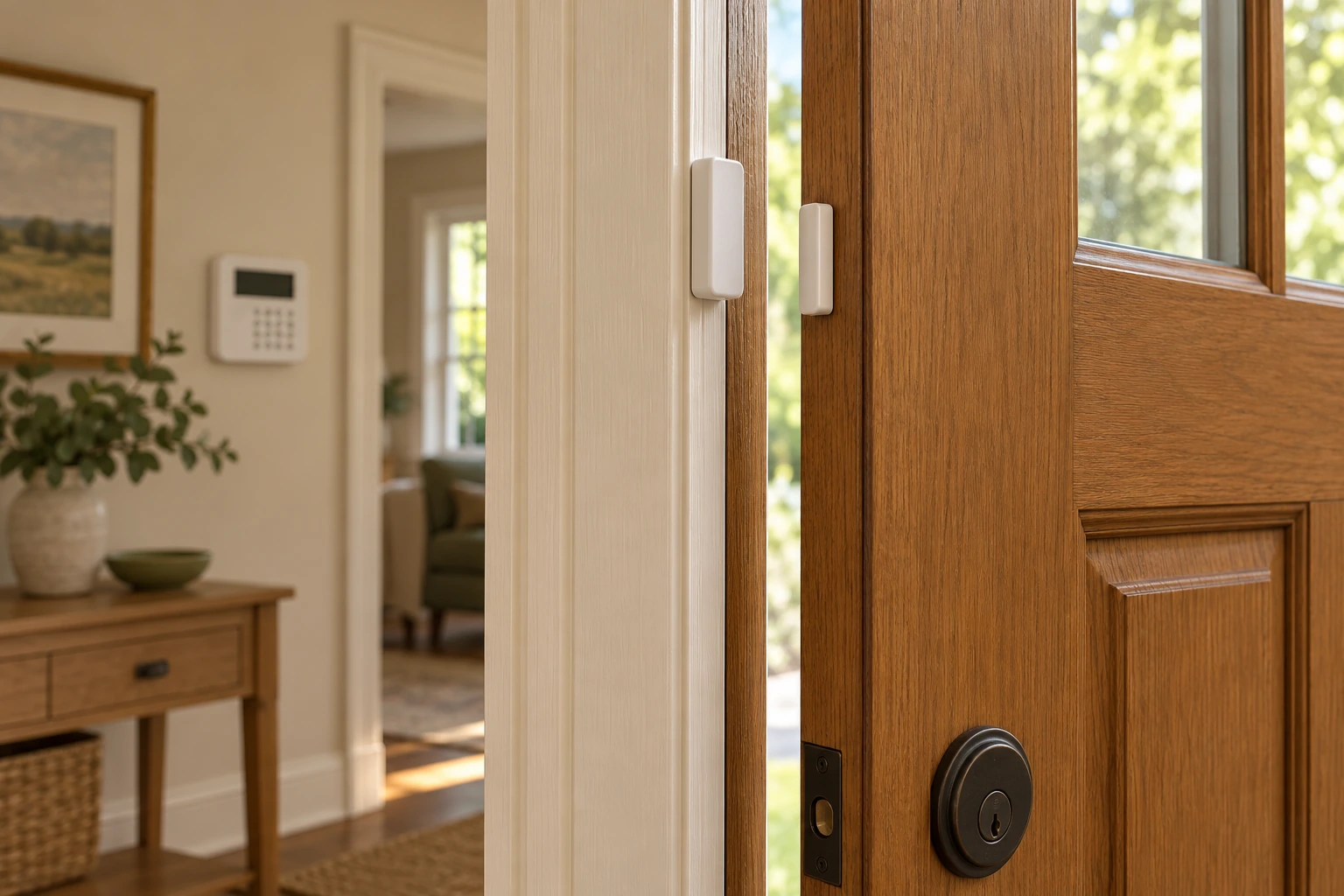
A larger closed sensor housing is on the fixed frame and a smaller housing is on the moving door. Their changing relationship explains an opening event for the actual alarm system; the background keypad is a separate part of that system.
About this illustration
No installation gap, wiring, radio performance, battery, armed state, account or completed response is established. This is a conceptual teaching model, not an assessment of your home.
8 picture lessons appear beside the questions in this guide. Use them to understand the explanation, then consider what it means for your home.
What are you actually buying with the security system?
A home security system can include door sensors, a control panel, cameras, local or cloud recording, phone notifications and a separate monitoring service. The hardware is only one part of the purchase. The new owner also needs the appropriate control of accounts, devices and services, plus an understandable record of what is included and what remains unconfirmed. A camera fixed to a wall does not establish who can view it.
Start by separating four questions: which physical equipment remains, who has administrative authority, which services continue and what the system actually does under its identified arrangement. A listing saying “security included” can leave all four vague. A seller’s demonstration may show a current notification on their phone without establishing the buyer’s future control, recording rights, monitoring contract or local alarm-permit position.
This guide owns the buyer handover. The smart-home automation guide explains sensors and rules; the home-internet guide explains network and connectivity. Here, connect those mechanisms to a transaction and an authorized transfer. Named Ring examples show why equipment categories and accounts matter. Canadian privacy guidance and Calgary alarm pages are used within their actual scopes, without supplying a nationwide legal verdict or a promise that a particular product works the same way everywhere.
Agree on a privacy-conscious process through appropriate transaction channels. Do not ask the seller for a shared master password, browse their recordings or trigger an alarm to test dispatch. The goal is the new owner’s legitimate control and a documented service arrangement, not access to the previous household’s private information. Any needed technical demonstration or testing should be authorized and coordinated so it does not create an emergency response or expose personal data.
What does a door contact detect?
A door contact commonly uses two parts: a sensor housing and a magnet housing. One is attached to the fixed frame and the other to the moving door. In the named Ring Alarm Contact Sensor 2nd Generation example, their relationship lets the system recognize an opening event. That event is information for the alarm system; it is not by itself proof that a monitoring centre or police service has been contacted.
The close-up shows separate closed housings beside a slightly open door, with a keypad farther inside. The sensor and magnet provide a useful physical explanation without exposing electronics. Their illustrated separation is not an installation gap or evidence of an armed state. The picture cannot identify hidden wiring, radio performance, a working battery or which account receives the event. Ask which actual model and base system are present.
A sensor, an alarm rule and a response service do different jobs. The sensor reports its relevant state; the configured system interprets events within its mode and rules; a communication path may send a notification or service message. A door opening during an authorized demonstration could be expected behaviour rather than an alarm. Conversely, a light or phone message cannot prove every link in that path has been checked.
For the purchase, request a device list matched to locations and model identities. Ask the responsible provider or installer how a coordinated handover establishes intended operation without an unplanned alarm response. We do not reproduce manufacturer mounting distances, battery opening, pairing, resets or arming procedures. Those details belong to the actual model and authorized instructions, rather than to a conceptual picture of familiar parts.
Two housings connect a door movement with an event
A larger closed sensor housing is on the fixed frame and a smaller housing is on the moving door. Their changing relationship explains an opening event for the actual alarm system; the background keypad is a separate part of that system.
Numbers identify the parts explained below.
- Fixed-frame housing
Remains with the frame. Its electronics stay concealed.
- Moving-door housing
Moves with the door. Its illustrated separation is not an installation dimension.
- Keypad context
Belongs to a separate control interface. The blank background display supplies no operating result.
What does this illustration leave out?
No installation gap, wiring, radio performance, battery, armed state, account or completed response is established. This illustration explains an idea. It is not an installation guide.
Which actual model, panel and authorized verification explain what this contact event does?
Explore this with HomeAI ↗Opens an editable question. Nothing is sent until you choose to send it.Two housings connect a door movement with an event
A larger closed sensor housing is on the fixed frame and a smaller housing is on the moving door. Their changing relationship explains an opening event for the actual alarm system; the background keypad is a separate part of that system.
- Fixed-frame housing
- Remains with the frame. Its electronics stay concealed.
- Moving-door housing
- Moves with the door. Its illustrated separation is not an installation dimension.
- Keypad context
- Belongs to a separate control interface. The blank background display supplies no operating result.
What remains unknown: No installation gap, wiring, radio performance, battery, armed state, account or completed response is established.
A useful question: Which actual model, panel and authorized verification explain what this contact event does?
Source context: Ring — Installing your Contact Sensor (2nd Generation)
How does an event travel from a sensor to a response?
A security event begins at a device, such as a contact reporting that a door has opened. A panel or hub receives and interprets that event under its configured rules. A communication route can then carry a message to an app or monitoring service. Someone or some policy decides what happens next. These stages are connected, but a successful observation at one stage is not proof of a completed response at the end.
The event-path figure draws sensor, panel, communication, monitoring and response as separate stages. Power and connectivity dependencies sit beside the relevant parts rather than being hidden in one arrow labelled “protected.” The diagram is conceptual. It does not assert that a particular alarm uses Wi-Fi, cellular backup, a named protocol or a specific monitoring arrangement. The actual installed product and subscription determine those details.
This is why “the alarm works” is too broad a handover statement. It might mean a keypad displayed a door event, a siren sounded, a phone notification arrived or a monitoring centre received a coordinated test message. Each is different evidence. Ask the provider to state the actual authorized task, device locations, operating condition and result, keeping untested functions and exclusions visible.
Do not trigger a distress, hold-up or intrusion event as an improvised buyer test. The monitoring provider should coordinate any needed verification under its own appropriate procedures. A purchase record can describe a legitimate demonstration without reproducing a bypass method or revealing access codes. What matters is whether the defined checks support the intended service, and what additional account or configuration work remains for possession.
An event has several stages
A sensor event reaches a panel, then an actual communication and service arrangement may carry it onward. The response decision is separate from the original event, so one observed notification does not verify the whole chain.
Numbers identify the parts explained below.
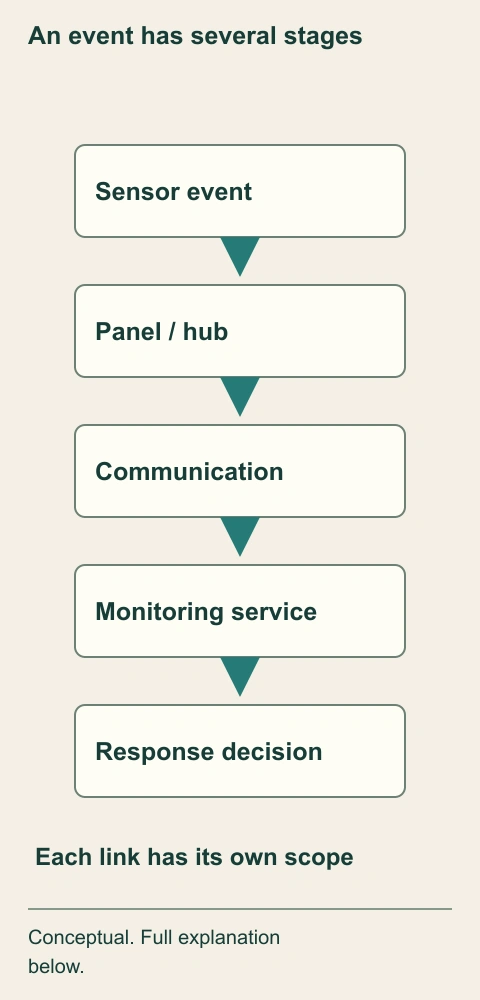
- Sensor and panel
Gather and interpret selected events. Modes and rules depend on the actual system.
- Communication and service
Carry and handle messages. Connectivity and contracts have their own conditions.
- Response
Is a separate decision. A notification does not guarantee attendance.
What does this illustration leave out?
Conceptual path; no protocol, subscription, dispatch guarantee or actual test. This illustration explains an idea. It is not an installation guide.
Which links did the authorized verification actually address?
Explore this with HomeAI ↗Opens an editable question. Nothing is sent until you choose to send it.An event has several stages
A sensor event reaches a panel, then an actual communication and service arrangement may carry it onward. The response decision is separate from the original event, so one observed notification does not verify the whole chain.
- Sensor and panel
- Gather and interpret selected events. Modes and rules depend on the actual system.
- Communication and service
- Carry and handle messages. Connectivity and contracts have their own conditions.
- Response
- Is a separate decision. A notification does not guarantee attendance.
What remains unknown: Conceptual path; no protocol, subscription, dispatch guarantee or actual test.
A useful question: Which links did the authorized verification actually address?
Source context: Ring — Installing your Contact Sensor (2nd Generation); Calgary Police Service — Responding to alarms and false alarms
How are notifications, monitoring and police response different?
A notification tells a selected user something happened. Monitoring is a contracted service with its own event handling and contact arrangements. Police response is a separate public-service decision under applicable local policy. None should be silently inferred from the presence of a camera, a siren or a subscription icon. The purchase needs the actual service description and current contact or permit requirements for the relevant location.
Calgary Police Service’s current alarm pages explain local permit requirements and response conditions. The response page distinguishes verified or priority events and circumstances in which police may not be dispatched. It also describes monitoring-company contact efforts. These are Calgary-specific explanations, not Canada-wide rules or a guarantee of attendance. We adopt no fee, fine, response time, waiting period or assurance that a buyer’s test would result in dispatch.
Ask the monitoring company what is contracted for this address, who the subscriber will be, what communication arrangement is used and how keyholder information is updated through authorized channels. Ask the local authority separately about any applicable permit process. A former owner’s valid permit or monitoring invoice does not establish the new owner’s account, and neither document proves every sensor or communication function is in current condition.
If monitored response is essential, obtain the written answers before relying on the claim in the purchase decision. A self-monitored arrangement can be a different product choice, not an inferior or equivalent service by definition. The important point is that the household understands its actual responsibilities and limits. Do not let a demonstration of one phone notification decide a separate question about a monitoring contract or public response.
Do not combine three different responses
- Phone notificationReaches a selected app user Does not prove monitoring or dispatch.
- Monitoring serviceHandles relevant events under a contract Its current terms and contacts matter.
- Public responseFollows the actual authority’s policy No attendance or response time guarantee.
Calgary policy is local; no actual alarm test performed.
Further reading: Calgary Police Service — Alarm permit information; Calgary Police Service — Responding to alarms and false alarms.
What does a camera record, and where does it go?
A camera captures an image of the scene within its actual view. A system may store recordings locally, transmit them to another device or use a cloud service, depending on the product and configuration. Live viewing, event clips and retained history are different functions. A buyer needs the actual storage and access arrangement rather than assuming every camera continuously records or keeps footage for the same period.
The image-life-cycle diagram follows capture, possible storage, authorized viewing and deletion or retention settings as distinct stages. It contains no promised number of days or a claim that deleting an app erases every copy. A clip can have a different path from a live image, and an exported copy can be outside the original service. Ask the actual provider to explain the relevant data handling and account controls.
The Office of the Privacy Commissioner’s November 2022 connected-camera guidance encourages attention to account security, updates, privacy features and how personal information is collected. That is practical Canadian consumer guidance. It does not establish the legal position for every domestic, rental, shared-property or business use. Where recording another person’s space or a shared area creates a consequential legal question, obtain appropriate local legal or privacy advice.
For handover, agree what happens to the seller’s recordings and account through authorized, privacy-conscious processes. The buyer should not demand old footage or enter the previous household’s account as a shortcut. Equally, a seller saying “I deleted the app” does not explain device ownership, cloud service status or remaining user access. Document the manufacturer-supported transfer and the new owner’s intended data settings without claiming an erasure result that has not been verified.
Follow the image after capture
Capture, storage, access and retention are separate parts of the image’s life. A live view does not establish where clips are retained or what an exported copy does after leaving the service.
Numbers identify the parts explained below.
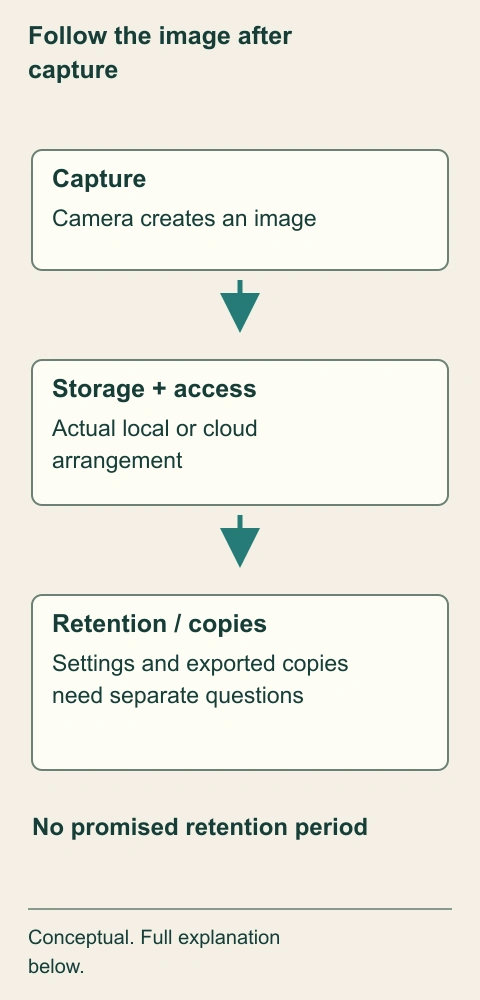
- Capture
Creates an image. The housing alone does not establish the recorded view.
- Storage and access
Hold and expose data under actual settings. Local and cloud arrangements differ by product.
- Retention and copies
Have their own controls. Deleting an app does not prove every copy is erased.
What does this illustration leave out?
No actual footage, erasure result, storage location, retention period or legal ruling. This illustration explains an idea. It is not an installation guide.
What does the actual provider say about storage, access, copies and retention for this arrangement?
Explore this with HomeAI ↗Opens an editable question. Nothing is sent until you choose to send it.Follow the image after capture
Capture, storage, access and retention are separate parts of the image’s life. A live view does not establish where clips are retained or what an exported copy does after leaving the service.
- Capture
- Creates an image. The housing alone does not establish the recorded view.
- Storage and access
- Hold and expose data under actual settings. Local and cloud arrangements differ by product.
- Retention and copies
- Have their own controls. Deleting an app does not prove every copy is erased.
What remains unknown: No actual footage, erasure result, storage location, retention period or legal ruling.
A useful question: What does the actual provider say about storage, access, copies and retention for this arrangement?
Source context: Office of the Privacy Commissioner of Canada — Connected cameras; Ring Canada — Transfer device ownership
Who can administer, view or change the system?
Administrative authority can allow someone to add users, change settings or manage devices. A shared user may have more limited capabilities, and an installer or service provider may have another role. The exact permissions depend on the product and service. Physical ownership of a camera does not by itself identify any of these roles. The buyer needs a clear explanation of who will retain access after the authorized transfer.
The roles diagram separates the new owner’s administrator role, other household access and any provider or installer access. It draws no passwords or hidden account details. Its purpose is to help the buyer ask who can see recordings, change settings, invite another user or alter service. A legitimate service relationship can be documented without giving a household’s master account to every person who works on the equipment.
Ring’s Canadian transfer article distinguishes an owner’s release of a device from removing hardware, deleting an app or cancelling a subscription. The complete page was served in French despite its English URL; that language and access scope remain in the source record. Device categories and account states differ, so this guide supplies no universal transfer button sequence, promised completion time or reset workaround.
Request an account-role handover plan, including how the actual manufacturer-supported process will establish the new owner’s authority and address old shared access. Do not ask to inspect existing password stores or accept a reused seller password. Any review of current device status should use authorized screens and avoid unnecessary personal information. If ownership or access cannot be resolved, keep the device outside the buyer’s relied-upon security arrangement until the provider supplies an appropriate answer.
Authority differs from possession
The owner role, household access and provider or installer role are drawn separately. A device attached to the home does not establish who can invite users, change settings or view recordings.
Numbers identify the parts explained below.
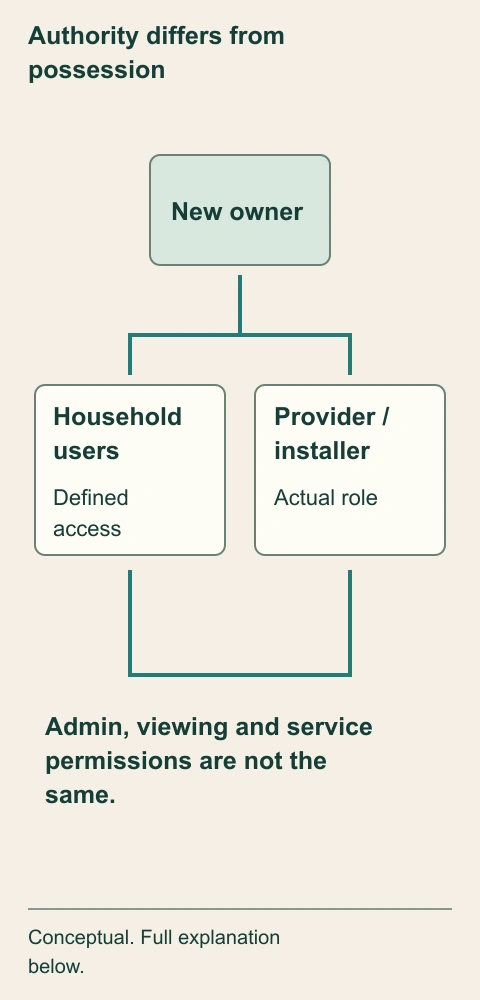
- Owner authority
Manages the actual account role. Use the provider’s supported process.
- Household access
Can have defined permissions. Shared access is not automatically owner authority.
- Provider role
Needs an understood scope. Service access should be documented appropriately.
What does this illustration leave out?
Conceptual roles, not actual account permissions or a transfer confirmation. This illustration explains an idea. It is not an installation guide.
Who will have each relevant permission after the supported ownership transfer?
Explore this with HomeAI ↗Opens an editable question. Nothing is sent until you choose to send it.Authority differs from possession
The owner role, household access and provider or installer role are drawn separately. A device attached to the home does not establish who can invite users, change settings or view recordings.
- Owner authority
- Manages the actual account role. Use the provider’s supported process.
- Household access
- Can have defined permissions. Shared access is not automatically owner authority.
- Provider role
- Needs an understood scope. Service access should be documented appropriately.
What remains unknown: Conceptual roles, not actual account permissions or a transfer confirmation.
A useful question: Who will have each relevant permission after the supported ownership transfer?
Source context: Ring Canada — Transfer device ownership; Office of the Privacy Commissioner of Canada — Connected cameras
Why does removing hardware differ from releasing ownership?
Physical removal changes where the hardware is. Account release changes its relationship to the owner’s account under the provider’s system. A subscription is another agreement, and recorded history is another data question. One action should not be assumed to complete all four. Ring’s transfer guidance expressly distinguishes these processes, which makes it a useful named example of why a handover cannot be reduced to “take the camera off the app.”
The handover-track figure gives hardware, device authority, subscription and data separate lines. A completed step on one line leaves the others visibly independent. The figure does not tell anyone to remove a device or perform a factory reset. It organizes confirmations the actual seller, buyer and provider may need to obtain under authorized processes, without exposing personal account identifiers or access codes.
For a device still associated with an unknown previous owner, follow the actual manufacturer’s ownership-support process. Do not attempt to bypass the association or request a stranger’s credentials. The retained article describes different conditions and a provider process, but this guide gives no waiting-period promise or escalation guarantee. Until the issue is resolved, possession of the device is not proof of usable administrative control.
This can affect the transaction if a particular system is important to the buyer. Clarify what equipment and services are included through the proper advisers, what transfer evidence is available and what happens if a relied-upon function remains unresolved. A seller can accurately include hardware while an account task is still pending; the record should say so. The buyer should not silently count that pending function as ready for use after possession.
One action is not four results
Hardware inclusion, device authority, subscription and data handling run on separate tracks. Completing one task leaves the other confirmations visible instead of treating a deleted app or removed camera as a complete handover.
Numbers identify the parts explained below.
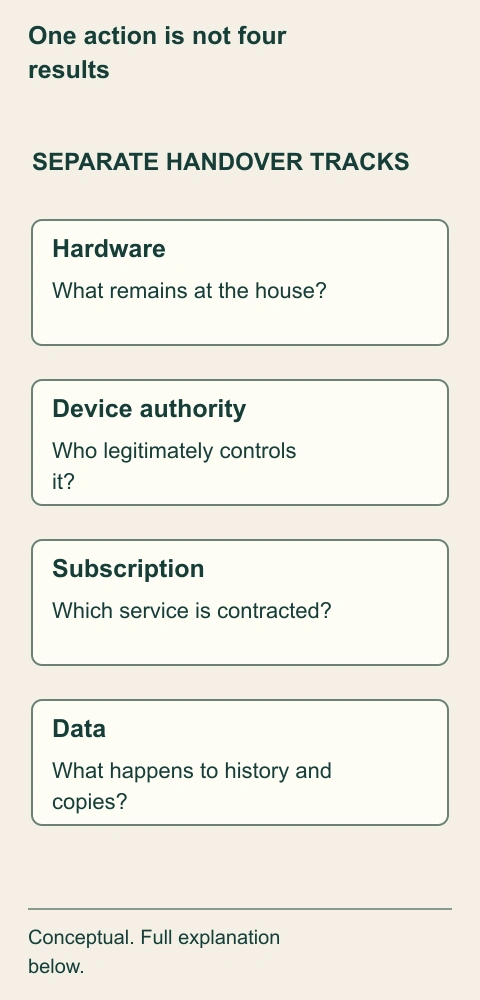
- Hardware
Defines physical inclusion. Possession is not administrative authority.
- Authority and service
Need separate supported confirmations. A transfer is not automatically a subscription change.
- Data
Needs authorized handling. Privacy and any preservation requirements remain relevant.
What does this illustration leave out?
No instruction to reset, remove, transfer or delete; no completion or erasure claim. This illustration explains an idea. It is not an installation guide.
Which supported confirmation is still needed on each actual track?
Explore this with HomeAI ↗Opens an editable question. Nothing is sent until you choose to send it.One action is not four results
Hardware inclusion, device authority, subscription and data handling run on separate tracks. Completing one task leaves the other confirmations visible instead of treating a deleted app or removed camera as a complete handover.
- Hardware
- Defines physical inclusion. Possession is not administrative authority.
- Authority and service
- Need separate supported confirmations. A transfer is not automatically a subscription change.
- Data
- Needs authorized handling. Privacy and any preservation requirements remain relevant.
What remains unknown: No instruction to reset, remove, transfer or delete; no completion or erasure claim.
A useful question: Which supported confirmation is still needed on each actual track?
Source context: Ring Canada — Transfer device ownership; Office of the Privacy Commissioner of Canada — Connected cameras
Physical, account and service status differ
- Hardware includedDescribes what stays at the property Does not establish account authority.
- Supported device transferChanges the relevant provider association Does not automatically cancel or establish a subscription.
- Data handlingAddresses history, access and copies appropriately No app deletion proves universal erasure.
Named manufacturer/consumer guidance; no universal transfer or deletion procedure.
Further reading: Ring Canada — Transfer device ownership; Office of the Privacy Commissioner of Canada — Connected cameras.
What depends on power, internet and cellular service?
Sensors, panels, cameras, routers and communication services can have different power and connectivity needs. Some products offer local functions or backup arrangements; others depend on a particular connection or subscription for a particular feature. A buyer should identify these dependencies for the actual installation rather than assume that a battery-powered sensor makes the entire response chain independent of household power or internet.
The dependency figure separates a local device path, household networking and a possible contracted external route. It labels backup as a question for the actual model and service. No line promises a cellular function, backup duration or retained recording during an outage. The useful lesson is that loss of one dependency may affect a selected stage differently from another, so the provider’s explanation must identify which function it describes.
Ask what happens to local sensing, audible alarms, recording, app access and monitoring messages under the relevant interruption. Keep each answer attached to the product, configuration and test scope. A router replacement can also require an authorized system reconfiguration; it should not be treated as evidence that the cameras are defective or as permission to bypass account controls. The home-internet guide explains the separate modem, router and Wi-Fi roles.
Do not unplug a panel or disable a communication path during a viewing to create an outage test. Any necessary verification should be coordinated with the owner and responsible provider. A documented explanation may reveal that the household needs a different arrangement, but it should not become a remote assurance of continuous protection. If uninterrupted monitoring is essential, obtain specific technical and service advice before relying on it in the purchase.
Identify what each stage needs
The diagram separates local equipment, household connection and external service. Backup and local functions must be confirmed for the actual model rather than inferred from one battery-powered sensor.
Numbers identify the parts explained below.
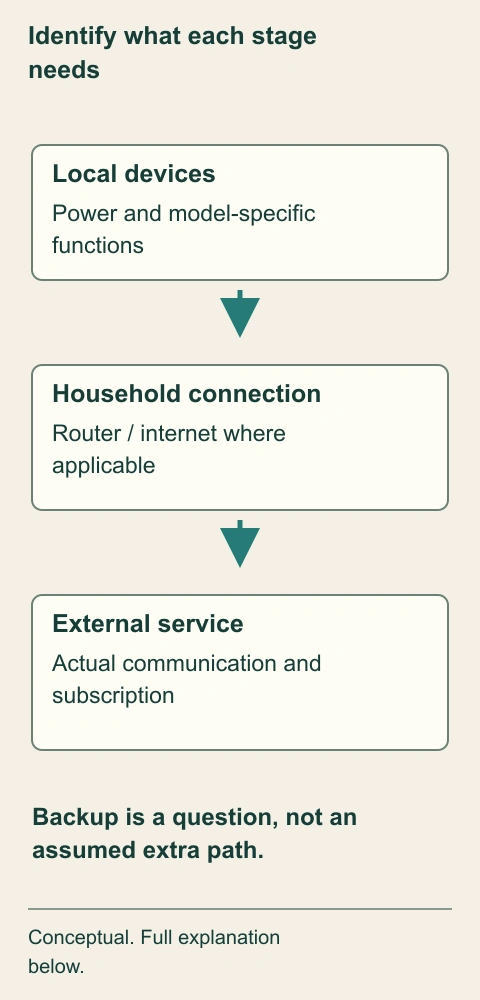
- Local equipment
Needs its actual supply and configuration. One device battery does not cover the whole chain.
- Connection
May carry relevant messages. The actual model determines its network dependencies.
- External service
Uses its contracted arrangement. Ask separately about any backup path.
What does this illustration leave out?
No backup duration, cellular feature, recording continuity, outage test or guarantee. This illustration explains an idea. It is not an installation guide.
What does each actual function require, and which interruption was addressed by authorized verification?
Explore this with HomeAI ↗Opens an editable question. Nothing is sent until you choose to send it.Identify what each stage needs
The diagram separates local equipment, household connection and external service. Backup and local functions must be confirmed for the actual model rather than inferred from one battery-powered sensor.
- Local equipment
- Needs its actual supply and configuration. One device battery does not cover the whole chain.
- Connection
- May carry relevant messages. The actual model determines its network dependencies.
- External service
- Uses its contracted arrangement. Ask separately about any backup path.
What remains unknown: No backup duration, cellular feature, recording continuity, outage test or guarantee.
A useful question: What does each actual function require, and which interruption was addressed by authorized verification?
Source context: Ring — Installing your Contact Sensor (2nd Generation); Calgary Police Service — Responding to alarms and false alarms; Office of the Privacy Commissioner of Canada — Connected cameras
What does the camera’s view mean for privacy?
A camera’s physical position and lens help determine what it can see, while actual field of view, orientation, configuration and surrounding conditions determine the recorded scene. The exterior picture shows a small camera beside one entrance, a separate neighbouring entrance and window, and a dividing fence. It makes the proximity question understandable. It does not show the camera’s actual image or establish that the neighbour is being recorded.
Start by asking where authorized live views or provider documentation can establish the intended coverage without capturing or distributing unnecessary personal information. A sales photograph of a camera housing is not a privacy assessment. Neither is an illustrative shaded cone, which is why our picture has no invented field-of-view overlay. The actual product and installation need to be understood before discussing what settings or other changes might be appropriate.
The Canadian Privacy Commissioner’s guidance encourages thoughtful placement, awareness of sensitive areas, privacy controls and attention to microphones and data use. Apply that as consumer education, not as a blanket legal permission to record a neighbour, visitor, tenant or common area. Shared-property documents and the actual local legal context can create separate questions, requiring appropriate advice where the answer matters to the intended use.
The buyer can decide not to rely on a disputed or unexplained camera view while the issue is clarified. That is different from assuming the whole system is unlawful or safe. Obtain the relevant provider or installer explanation and, where necessary, local privacy or legal advice. Do not point the camera elsewhere, disable someone’s system or distribute screenshots as a buyer without appropriate authority. Handover should establish control and a supported intended use together.
A nearby neighbour creates a camera-view question
A small camera sits beside one entrance, with a separate neighbouring window and entrance beyond the dividing fence. These physical relationships show why the buyer should ask about the actual intended view and authorized controls rather than infer recording from the housing alone.
Numbers identify the parts explained below.

- Camera
Captures its actual configured scene. The housing alone does not show the image.
- Own entrance
Is one intended coverage question. No recording or service state is pictured.
- Neighbouring space
Requires thoughtful coverage enquiry. A fence is not a measured legal or optical boundary.
What does this illustration leave out?
No camera point of view, field-of-view cone, recording, privacy boundary, account access or legal finding. This illustration explains an idea. It is not an installation guide.
What does the authorized actual view and relevant advice establish about intended coverage?
Explore this with HomeAI ↗Opens an editable question. Nothing is sent until you choose to send it.A nearby neighbour creates a camera-view question
A small camera sits beside one entrance, with a separate neighbouring window and entrance beyond the dividing fence. These physical relationships show why the buyer should ask about the actual intended view and authorized controls rather than infer recording from the housing alone.
- Camera
- Captures its actual configured scene. The housing alone does not show the image.
- Own entrance
- Is one intended coverage question. No recording or service state is pictured.
- Neighbouring space
- Requires thoughtful coverage enquiry. A fence is not a measured legal or optical boundary.
What remains unknown: No camera point of view, field-of-view cone, recording, privacy boundary, account access or legal finding.
A useful question: What does the authorized actual view and relevant advice establish about intended coverage?
Source context: Office of the Privacy Commissioner of Canada — Connected cameras
What changes in a condo, rental or shared entrance?
A device beside a private entrance can still involve a shared wall, common area, neighbour or tenant. The physical component, mounting location, field of view and service account can each have a different responsible person. A buyer needs the actual property documents and service arrangements, rather than assuming a seller’s individual account establishes permission to retain or alter the installation.
Ask which equipment belongs to the unit, the building, a landlord or a service provider, and what the relevant documents say about installation, use and changes. This guide supplies no Canada-wide condominium or tenancy rule. The correct answer depends on the jurisdiction, property form and actual agreements, interpreted through appropriate advisers. A management email, an equipment invoice and a registered property document should retain their separate purposes.
For a building entry system, distinguish access control from the unit’s alarm or camera subscription. A door-entry credential may operate common equipment without giving the resident administrative control of the building system. Likewise, a unit camera may use a private account while its placement raises shared-property questions. The buyer should not copy, test or redistribute access credentials as an informal investigation.
If a seller says an installation is approved, ask for the actual relevant record and whether it covers the present equipment and intended use. A proposal, past permission or expired service arrangement may not answer the current question. Keep any unresolved shared-use or authority issue visible in the purchase advice. The goal is an appropriate, documented handover, not an invented approval or a legal conclusion drawn from a camera’s appearance.
What records help distinguish a service from a sales claim?
The equipment list identifies physical components and model numbers. Installation and service records describe selected work. The monitoring agreement describes a contracted service. Account-role information describes who can control devices. Local permit records address a separate administrative requirement where applicable. Together they can explain the arrangement, but no single document should be made to answer every question.
Read dates, address, device locations and scope before accepting the phrase “recently serviced.” An invoice for a replacement contact does not establish the camera storage arrangement or a monitoring contract. A subscription payment does not prove every sensor was checked. A handover screen can show device association without proving a coordinated response test. Ask for the missing answer directly rather than requesting more unrelated paperwork.
For a claimed feature, identify the evidence that would actually support it. If the claim is that the buyer will control the camera, obtain confirmation of the supported transfer status. If it is that a monitoring service will continue, obtain the provider’s current agreement and new-account requirements. If it concerns local response, use the relevant authority’s current policy. None of these requires sharing the seller’s private recordings or password vault.
Keep supplier marketing separate from the installed arrangement. A product line may offer optional features that were never purchased, configured or supported at this address. A different model manual is not a substitute for the actual one. Where a feature materially affects the purchase, ask the provider to state what is included, what requires a separate service and what remains unavailable or unverified under the current circumstances.
How can a legitimate handover be verified without causing an alarm?
A legitimate verification begins with an agreed scope and the responsible parties’ authorization. The owner and relevant provider can coordinate appropriate checks and account tasks so that an ordinary demonstration does not become an unplanned monitored event. A buyer should request an understandable record of what was verified, rather than independently experimenting with door contacts, panic buttons or disconnected communication equipment.
The useful scope might distinguish device identity, authorized owner control, selected local behaviour and the contracted monitoring path. The actual provider decides appropriate procedures for its system; this guide does not publish an arming, bypass or test sequence. A record should state the relevant operating conditions and results without exposing codes or private account data. An excluded or untested function should remain identified as such.
Alternative explanations matter when a notification is absent. The issue might involve permissions, settings, connectivity, service status or the device itself. This list is a reason to obtain the right support, not a remote diagnosis. A successful message on one phone also leaves other users, devices and response functions outside that observation. Avoid a global “passed” label where only one part of the intended arrangement was demonstrated.
For unresolved transfer, ask what manufacturer-supported confirmation is needed and who is responsible for obtaining it. For unresolved response, ask the monitoring provider and relevant local authority different questions. Keep a staged verification record: completed, pending and not included. The purchase can then rely on what actually exists, with transaction advice about anything essential that remains pending rather than a fictional certified security outcome.
What should be completed for possession day?
Possession changes who should control the home’s included equipment, but it does not automatically complete every provider’s account process. The handover needs the actual hardware inclusion, legitimate new-owner authority, intended user access, current service agreement and relevant local administrative details. These can have separate completion evidence. Record them separately instead of relying on the arrival of keys as proof that the digital side is finished.
Prepare an equipment and service sheet without passwords: model identities, locations, applicable manuals, authorized support contacts, subscription status and the date of relevant confirmations. State any pending ownership request or unavailable feature. The new owner should use their own appropriate account and security settings through the actual provider process. Do not place access codes, private recordings or recovery secrets in a public listing or transferable educational worksheet.
Confirm with the relevant provider how old users and installer access are handled, how current contact information is recorded and how the buyer can understand data settings. For Calgary, the current local alarm-permit information is a separate task; another location needs its own current authority’s answer. A former owner’s permit, phone number or keyholder entry should not silently remain the assumed basis of the new household’s response arrangement.
Finally, decide how to handle any equipment whose authority or privacy position remains unresolved. It may need provider support or another appropriate arrangement before the buyer relies on it. Do not invent a reset, removal or disconnection procedure to force completion. The useful result is a documented possession plan that tells the new owner what is ready, what is still pending and who can properly resolve each remaining question.
Fictional case: the camera is included but the account is not transferred
Imani is buying a home with a door camera, three contact sensors and a monitoring claim in the listing. The invented file includes hardware invoices, a seller screenshot showing a live view and an older monitoring statement. The seller offers to leave a shared account password. These are fictional records used to explain the decision, not actual HomeAI access, alarm testing or a security finding.
The screenshot demonstrates a view through the seller’s current account at one moment. It does not establish Imani’s owner authority or who else has access. The monitoring statement identifies a historical service period, not the buyer’s new contract. One plausible explanation is that ordinary provider-supported transfer and service tasks can resolve the gaps. Another is that a particular feature will require different equipment or service. The current file does not settle that question.
Imani declines the shared-password shortcut and asks for a manufacturer-supported ownership process, a current provider explanation of monitoring and an appropriate account-role confirmation. She also asks whether any local permit task applies and what the camera’s intended view covers. She does not inspect the seller’s recordings, trigger an alarm or assume the neighbour is recorded from the camera’s visible position.
Until those answers are obtained, Imani evaluates the purchase without relying on the included equipment as a ready monitored system. Her transaction adviser addresses the consequence of the unresolved inclusion claim, while the actual provider handles technical and account tasks. The fictional outcome is a better-defined purchase basis, not an invented transfer success, police response, deletion certificate or legality ruling. The important evidence is legitimate control and a supported service description, not possession of someone else’s password.
A seller view is not buyer control
Imani’s fictional screenshot shows a seller account view and an older service statement. She seeks supported owner authority and current service evidence instead of relying on a shared password or an unplanned alarm test.
Numbers identify the parts explained below.
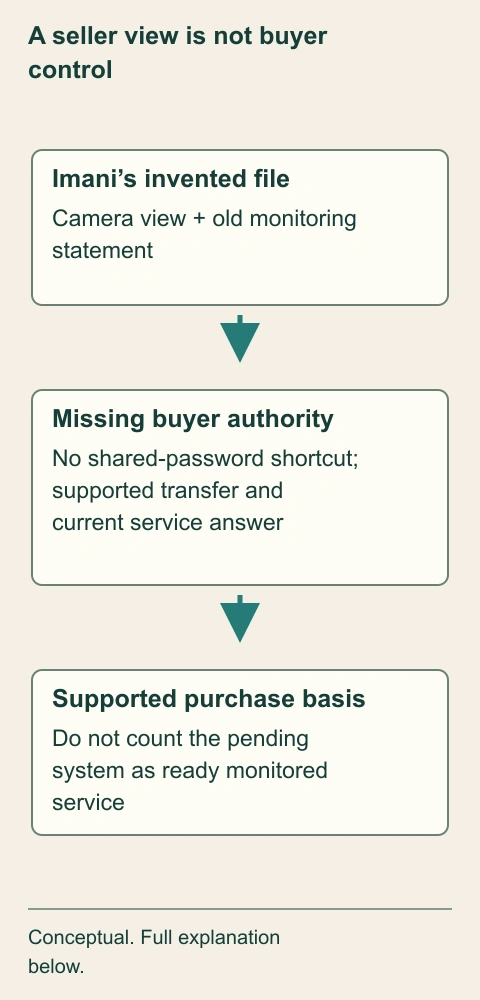
- Invented evidence
Shows a limited prior state. It does not establish the buyer’s future account.
- Authorized handover
Needs current provider answers. Do not inspect private recordings or share old credentials.
- Purchase decision
Uses what is supported. Transaction advice addresses an essential unresolved claim.
What does this illustration leave out?
Entirely fictional; no transfer success, dispatch, erasure certificate or actual legal ruling. This illustration explains an idea. It is not an installation guide.
Does the purchase depend on a monitored arrangement that is still unconfirmed?
Explore this with HomeAI ↗Opens an editable question. Nothing is sent until you choose to send it.A seller view is not buyer control
Imani’s fictional screenshot shows a seller account view and an older service statement. She seeks supported owner authority and current service evidence instead of relying on a shared password or an unplanned alarm test.
- Invented evidence
- Shows a limited prior state. It does not establish the buyer’s future account.
- Authorized handover
- Needs current provider answers. Do not inspect private recordings or share old credentials.
- Purchase decision
- Uses what is supported. Transaction advice addresses an essential unresolved claim.
What remains unknown: Entirely fictional; no transfer success, dispatch, erasure certificate or actual legal ruling.
A useful question: Does the purchase depend on a monitored arrangement that is still unconfirmed?
Source context: Ring Canada — Transfer device ownership; Calgary Police Service — Alarm permit information; Calgary Police Service — Responding to alarms and false alarms; Office of the Privacy Commissioner of Canada — Connected cameras
What questions should decide the final purchase basis?
First ask whether the household understands the physical system: contacts and cameras gather information; a panel or hub interprets selected events; communication and service arrangements carry them onward. Then ask who can control those parts, where images can be stored or viewed and what service is actually contracted. This separates understandable mechanisms from a broad reassurance that the home is “protected.”
The final question sheet gives each essential claim an owner, record and remaining task. Hardware included is different from account authority transferred. A current subscription is different from local response. A visible camera is different from its actual recorded view. Leave unresolved fields visible and seek the appropriate provider, technical or transaction advice where they matter. A completed field should identify its actual evidence and date rather than a generic check mark.
There can be several reasonable purchase outcomes. The included arrangement may be supported after ordinary authorized handover, a limited feature may remain pending, or the household may choose another service. Those outcomes need the actual facts and advice. The guide does not rank every product or promise security, and no single demonstration establishes protection against every event. The household should rely only on the arrangement it can legitimately control and understand.
Keep the source boundaries attached: Ring supplies named product and ownership examples, not universal instructions; the Canadian Privacy Commissioner supplies consumer camera guidance from November 2022; Calgary’s current pages describe local permit and response context. No national legal permission, current fee or guaranteed dispatch is supplied. The result should be a clearer, privacy-conscious handover and a truthful purchase record, with no need to expose passwords or anyone’s private footage.
Keep learning about the connected parts
- Smart-home automations: follow the sensor, rule and physical result
- How home internet works: follow the service, router and room connection
- A condo envelope project: what was investigated, contracted and completed?
Canadian context and authorities · Visual atlas · Learning labs
Practice the distinction.
Fictional case: a seller view is not buyer authority
Imani’s invented file has hardware invoices, a seller live-view screenshot and an older monitoring statement; the seller offers a shared password.
Reported observations
- The screenshot shows the seller’s current account, not Imani’s future authority.
- The monitoring statement covers a previous service period.
- The camera’s actual intended view and remaining users are not confirmed.
Compare the explanations
Expand each possibility to see the evidence needed to distinguish it. Similar symptoms can have different mechanisms.
Ordinary supported handover may resolve the gaps
Its actual completion and current service still need confirmation.
Use manufacturer-supported ownership and provider account-role evidence.
A relied-upon feature may need a different arrangement
Hardware possession alone does not establish ready monitored service.
Obtain the actual provider’s current contract and relevant local policy answer.
A useful next question
Imani declines the shared-password shortcut and relies only on supported functions while authorized ownership, privacy and service questions are resolved with provider and transaction advice.
Entirely fictional. No transfer success, alarm test, erasure certificate, dispatch or legality ruling.
Know what the words mean.
- Contact sensor
- A device that reports a selected opening state, commonly through a sensor and magnet associated with a door or window.
- Alarm panel or hub
- Equipment that receives and interprets relevant device events under its configured arrangement.
- Monitoring service
- A contracted service for handling relevant system messages, separate from local sensing or public response.
- Administrative authority
- The legitimate account role able to manage the actual device or system permissions.
- Shared user
- A user with the permissions defined by the actual account arrangement, not automatically owner authority.
- Device ownership transfer
- The provider-supported process for changing a device’s account association, distinct from physical possession.
- Recording retention
- The actual settings and arrangements governing how long recordings are held; copies can have separate paths.
- Response policy
- The applicable service or authority’s conditions for acting on a message, distinct from notification delivery.
Questions to bring
to the conversation.
- What equipment and services are actually included?
- Which supported process establishes the new owner’s authority and handles remaining users?
- What are the actual storage, service and local response arrangements?
- Which legitimate verification is complete, pending or outside scope?
Separate a showing observation, an existing record and a new professional assessment. Unknown means a question remains; it does not automatically mean a defect.
Use the evidence planner ↗Go to the source.
Original HomeAI explanation informed by these public references. Sources support the underlying guidance; they have not reviewed or endorsed HomeAI. Diagrams are conceptual, and calculator outputs depend on your inputs.
Ring sources are named manufacturer examples; Contact Sensor support is US-served, while the Canadian transfer body was served in French. Relative update labels are not invented dates. OPC guidance is November 2022/modifiedNovember24; Calgary permit and response are local and undated. No passwords, footage, account mutation, transfer/reset/deletion procedure, alarm test, dispatch promise, current fee or universal privacy/legal finding. Preserve any applicable recording-preservation question through appropriate advice.
Publication & source review
First published .
Sources reviewed .
Have a question about your home?
Start with the symptom, timing and what you have observed.
Ask HomeAI